
skycrown casino Registration
Skycrown registration takes 2 to 3 minutes and creates your account on sky-crowncasino.org. We welcome adult players in Australia who provide accurate details and complete our identity checks. Keep one account per person, with contact details that belong to you. Prepare your information before starting so confirmation reaches the right inbox or phone without unnecessary delays.
Before You Register at skycrown casino
Before starting Skycrown registration, prepare a device with internet access and a working email address or mobile number. Players in Australia must meet our minimum age requirement. Enter real personal details that match your identity documents, rather than a nickname or someone else’s information. An existing membership means signing in instead of opening another profile. Keep access to your chosen contact method throughout setup, because we send confirmation there.
Once signed in, you have a profile for accessing games, making deposits, requesting withdrawals and contacting support. Players in Australia should choose Australian dollars during setup. Think about what you can afford to spend before adding funds, keeping essential expenses separate. Approach gambling as paid entertainment within a fixed budget, not a way to cover bills or recover earlier losses.
How to Register at skycrown casino
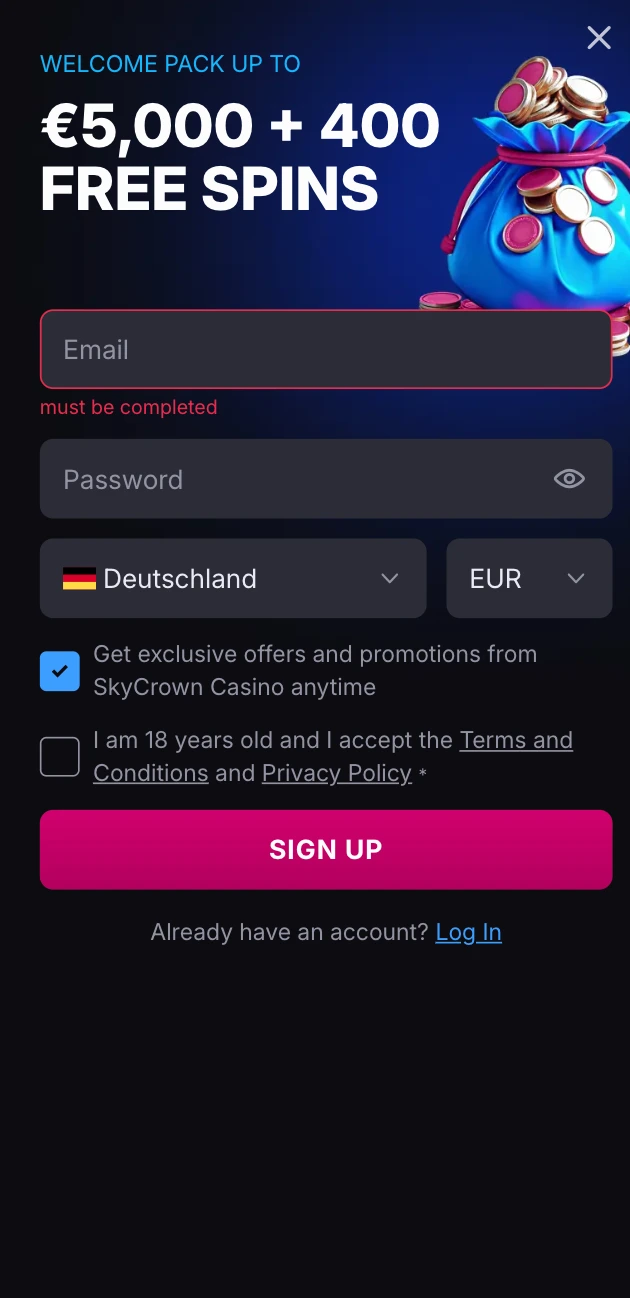
Start Skycrown registration with your contact details ready and enough time to complete confirmation. For Australia, a mobile number uses the international format +61 4XX XXX XXX. Choose an inbox or phone you control personally, rather than shared contact details. Follow these steps in order, checking each entry before moving forward.
- Type sky-crowncasino.org yourself into your browser’s address bar.
- Press registration to open our sign-up form.
- Enter an email address or phone number and create a password.
- Select your currency and country. Currency cannot be changed later.
- Confirm that you meet our age requirement and accept our terms.
- Enter the code or follow our confirmation link, then sign in.
Check your browser address before entering private information. Fake copies exist, so compare its spelling carefully with our domain rather than trusting a familiar appearance. Stop if an address differs. Returning directly through a typed address keeps Skycrown registration separate from unfamiliar links received through messages, adverts or search results.
Data You Provide
Our opening form collects contact information, login credentials and location choices. We request personal identity details during verification instead of asking for everything at once. Use this table to prepare accurate entries and understand the requirements attached to each field. Read through your selections before submitting, especially anything that cannot be changed afterwards.
| Data | When We Ask | Requirement |
|---|---|---|
| Email or phone | Sign-up | Confirmation code: 6 digits; valid for 15 minutes |
| Password | Sign-up | At least 8 characters; at least 1 letter and 1 number |
| Currency | Sign-up | 1 currency per account; AUD |
| Country | Sign-up | 1 country per account; Australia |
| Name and date of birth | Verification | Document match; minimum age 18 |
| Address | Verification | Proof not older than 3 months |
Details that differ from your documents need correction before we can complete identity checks. Do not substitute another person’s information to bypass a mismatch. Compare spelling, birth details and residential information carefully, then contact us about errors. Keeping a consistent record helps us connect your submitted evidence with the profile being reviewed.
Account Verification at skycrown casino
Skycrown registration includes an identity check, with ID verified within 72 hours of opening your account. This connects your personal information with supporting evidence. Prepare for that requirement from the start rather than leaving it until you want to access funds. Accurate entries during setup make the later comparison straightforward.
For players in Australia, suitable identity document types include a passport or driving licence. Present valid, unexpired identification with readable details. When preparing supporting images, show every edge, avoid glare and keep text in focus. A clear photograph helps us read names and dates without guessing. Never edit an image to change personal information.
We complete verification once, before your first withdrawal, and review takes from a few hours to 3 business days. That review period is separate from the requirement to have ID verified after opening. Build both into your planning for Skycrown registration. Respond accurately to any follow-up request rather than submitting conflicting versions of your details.
Steps After Registration
After Skycrown registration, spend a moment checking your profile before choosing how to play. Players in Australia should make spending decisions around their own circumstances, not expectations of winning. Work through these next steps deliberately, leaving room to stop whenever continuing no longer feels comfortable.
- Sign in and inspect your saved details. Resolve mistakes before moving on to payments.
- Once you have completed all the steps, you can take our welcome bonus: First Deposit Bonus 120% up to A$810 + 125 Free Spins. Full conditions are in the bonus section of sky-crowncasino.org.
- Make a first deposit only within your planned budget. Keep money needed for everyday expenses untouched.
- Explore our games and begin with a few titles. Read their rules before deciding whether to play.
- Set your own time and money limits. Visit our responsible gaming page for further information.
Gambling is entertainment, never income. A finished Skycrown registration does not create any obligation to deposit or continue playing. Stop when a planned session ends, regardless of its outcome. Gambling Help Online offers support if gambling starts affecting your wellbeing, relationships or finances, or if taking a break feels difficult.
Account Security at skycrown casino
Treat Skycrown registration as the beginning of careful login habits. Contact access and private credentials deserve attention beyond your first visit. Keep personal information away from anyone offering to manage play or resolve problems on your behalf. Use these practical steps whenever accessing your profile, especially from a device other people use.
- Choose a strong, unique password.
- Never share confirmation codes.
- Sign out on shared devices.
- Type sky-crowncasino.org yourself.
- Keep your contact details current.
We never ask for your password by message. Treat any such request as a reason to stop responding, even when it appears familiar. If something looks wrong during Skycrown registration, use our published support contact rather than replying with sensitive information. Keep control of sign-in details throughout every conversation about access.
Troubleshooting skycrown casino Registration
A typo or missing confirmation message can interrupt Skycrown registration. Other causes include a weak password, an incorrect country or currency selection, failing our age requirement, or an existing membership. Players in Australia should review location choices carefully before submission. Do not respond to an error by creating another profile, because that introduces a duplicate rather than resolving the original problem.
First, reread entries, inspect spam folders and confirm that your chosen phone or inbox receives messages. Review the requirements above before trying again. For unresolved Skycrown registration problems, write to support@sky-crowncasino.org with the step involved, what appeared onscreen, your device and browser. Describe any error wording clearly so we can understand where progress stopped. Never send a password.